At a glance
- Client / partner
- MaxOpsAI
- Industry
- PropTech · AI SaaS
- Services offered
- Web design & development
- Product marketing site
- Pricing & sign-up flows
- Demo booking funnel
- Tech stack used
- WordPress
- Typeform
- Calendly
- Pricing tables
- Lead intake form
- FAQ
MaxOpsAI is an AI platform for real estate agents and teams. It replies to new inbound leads, qualifies them and books appointments, reactivates cold contacts in a CRM and keeps past clients warm with check-ins and referral requests.
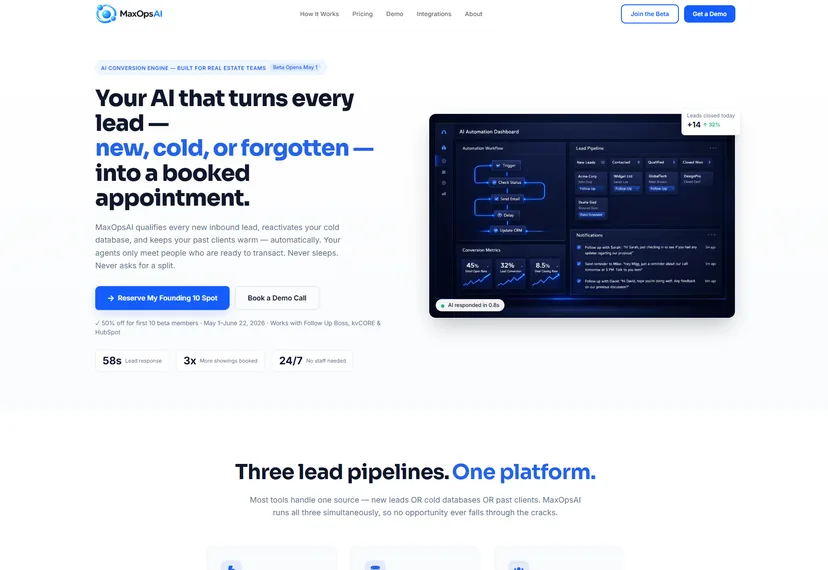
Zemotify designed and built the website that explains the product and converts visitors: a clear problem-and-solution story, a dashboard preview, integrations, pricing, and sign-up and demo-booking flows.
Introduction
Real estate teams lose deals in the gaps: inbound leads that wait too long for a reply, old contacts nobody calls, and past clients who drift away before they need an agent again.
MaxOpsAI covers all three gaps with AI. The site had to explain a product with three distinct jobs to busy agents, quickly and without jargon.
It also had to serve every size of buyer, from a solo agent to a brokerage with 10+ agents, and give each one an obvious next step.
The challenges
Selling an AI product to busy agents means making it concrete, fast:
-
Three products in one story
Inbound lead response, cold-database reactivation and past-client nurture each needed a clear explanation without the page feeling like three sites.
-
Fitting existing tools
Agents already live in their CRM and lead sources. The site had to show quickly that MaxOpsAI works with Follow Up Boss, kvCORE, Zillow and the rest.
-
Pricing for every team size
Solo agents and brokerages buy differently. Plans had to be easy to compare, with monthly and annual prices.
-
Showing an AI product
Visitors can’t feel an AI assistant from a page of text. They needed to see the dashboard and the path from lead to booked appointment.
-
From interest to a conversation
Every section needed a route to sign up, book a call or send leads through an intake form.
The approach
We built one long-form product page that answers questions in the order an agent asks them:
Problem, then solution
The page opens with the three lead pipelines, names the problem each one leaves unsolved and then shows how MaxOpsAI handles it.
A dashboard preview
A platform-features section shows the product interface, so visitors see lead responses and appointments rather than reading about them.
How it works in five steps
A step-by-step section walks from connecting tools to booked appointments, followed by use cases for different kinds of teams.
Integrations and pricing side by side
Fourteen named integrations and four plans, Starter, Growth, Pro and Enterprise, with monthly and annual prices, so teams can check fit and cost in one visit.
The funnel behind every sign-up
How the site takes an agent from curiosity to a conversation.
-
Three Pipelines
Inbound, cold database and past-client flows explained.
-
Platform Preview
A dashboard mock-up of the product in action.
-
How It Works
Five steps from setup to booked appointments.
-
Integrations
CRMs, lead sources and tools in one grid.
-
Pricing Plans
Four tiers with monthly and annual prices.
-
Booking & Intake
Calendly booking, Typeform sign-up and a lead intake form.
Questions answered before they’re asked
A common-questions section and a final call to action close the page, so no visitor reaches the end without a next step.
The outcome
What the live site delivers today. Figures are facts stated on maxopsai.com, not measured results:
One clear story: three AI pipelines explained on a single page, from problem to solution.
Fit made obvious: 14 integrations named, including Follow Up Boss, kvCORE, HubSpot, Salesforce and Zillow.
Transparent pricing: four plans from solo agent to brokerage, with annual prices shown.
Always a next step: booking, sign-up and a shareable lead intake form throughout the page.
- 3
AI pipelines explained on one page
- 14
Integrations named on the site
- 4
Pricing tiers, Starter to Enterprise
Technology used
The stack and tools as they appear on the live site:
| Platform | WordPress |
|---|---|
| Forms | Typeform sign-up and lead intake |
| Booking | Calendly demo and call booking |
| Integrations shown | Follow Up Boss, kvCORE, HubSpot, Salesforce, Pipedrive, Sierra Interactive, Zillow, Realtor.com, Homes.com, Twilio, Calendly, Google Calendar, Zapier, Stripe |
| Page sections | Pipelines, problem and solution, features, how it works, use cases, pricing, FAQ |